

If you've ever held a finished shirt, bottle label, or candle jar and thought the color looked flat, like something was missing between what you designed and what you received, the problem usually isn't your artwork. It's the color range your printer was working with.
Standard DTF printing builds color from four inks: cyan, magenta, yellow, and black, with white added for dark garments. That covers a lot of ground. But if your brand uses a vivid coral, a deep forest green, a punchy orange, or a royal blue that has to match across your shirts, your packaging, and your product labels, a four-channel setup can start to show its limits.
That's where Hyper+ comes in.
What Is Hyper+?
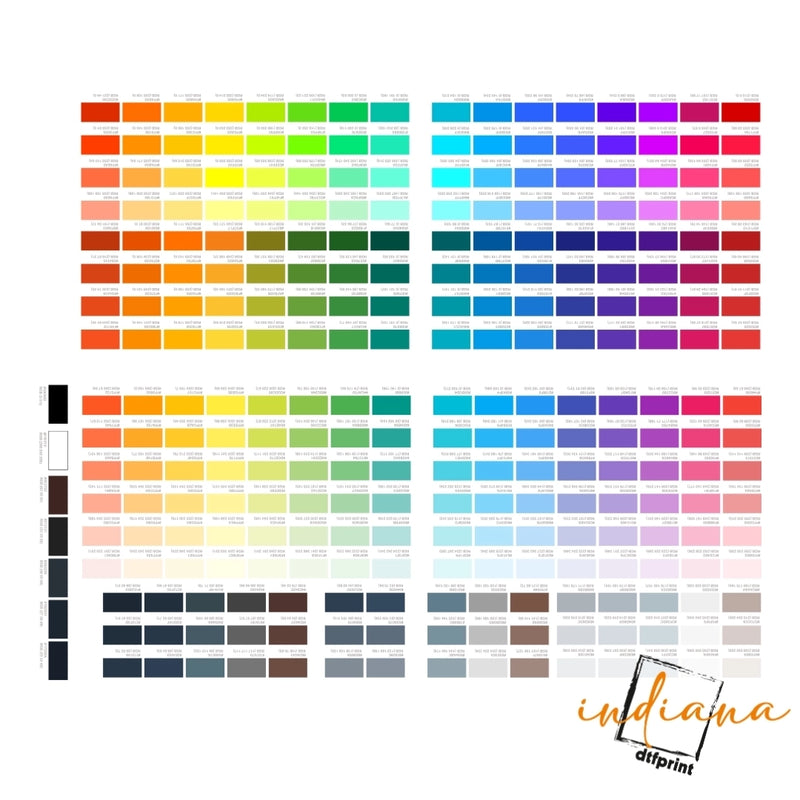
Hyper+ is a 9-color expanded-gamut print workflow built for DTF transfers, UV DTF decals, and custom branding projects that need a wider, more accurate color range than a standard CMYK setup can deliver.
A standard CMYK workflow uses four ink channels. DTF printing typically adds white as a fifth. A 9-color workflow adds more channels, often red, green, blue, and orange, to extend the range of printable colors and improve accuracy on tones that are hard to hit with a basic setup.
In practical terms, this means better results for vivid brand colors, smoother gradients, more accurate illustrated artwork, and cleaner output on detailed product labels and packaging. It doesn't mean every job needs it. A one-color staff shirt or a simple black logo on white cotton doesn't require expanded gamut. But colorful apparel graphics, detailed product labels, photo-style artwork, and anything where color accuracy directly affects how your brand is perceived, that's where Hyper Color 9 earns its place.
For Indiana businesses, the difference shows up in real life. A cold cup logo near Mass Ave, a candle label in Irvington, a hoodie graphic sold at a Fountain Square vendor market, or a boutique packaging sticker in Carmel, when a customer picks up your product, color is the first thing they judge.
Key Features
- Wider color range. The expanded ink channels reach colors that are difficult or impossible to hit accurately with a basic CMYK setup, particularly bright reds, vivid oranges, strong greens, and deep blues.
- Smoother gradients. More ink channels means more transitions are built from a fuller color palette rather than approximated from limited channels. Gradients, shadows, and soft blends print with less banding and more natural progression.
- Better detail on complex artwork. Illustrated designs, mascot graphics, brand logos with tight detail, and photo-style artwork all benefit from a wider gamut, colors stay distinct rather than mudding together.
- Consistent output across products. If your brand uses the same logo on shirts, cup decals, packaging stickers, and jar labels, expanded gamut gives each substrate a better chance of matching the others.
- UV DTF raised effect. On hard surface decals, UV DTF printing produces a slightly raised, glossy finish that makes logos and labels feel tactile and premium. This works across glass, acrylic, metal, ceramic, and rigid plastic surfaces.
- No compromise on workflow. The expanded color setup is a production-side decision. Your ordering process, upload artwork, choose product, confirm size, review proof, works the same way.
The Honest Part: What More Colors Can and Can't Do
More ink channels help with color range. They don't fix other problems.
A blurry screenshot prints like a blurry screenshot, with better color. A low-resolution logo doesn't sharpen because it's going through a 9-color workflow. Thin script fonts that are illegible at 1.5 inches stay illegible.
The fundamentals still apply. File quality, RIP settings, ink, film, powder, curing, surface prep, and press settings all affect the final result. Expanded gamut is an upgrade to color output, not a substitute for the rest of the process.
The clearest way to think about it: 9-color printing gives your artwork more to work with. The artwork still has to be worth working with.
For Apparel: When Hyper Color 9 Makes a Difference
For clothing brands, merch sellers, schools, gyms, and event groups, the benefit of expanded color is most visible on designs where color is part of the point.
A basic black logo on a white shirt doesn't need it. A full-front illustrated graphic on a dark hoodie, with shadows, highlights, and a brand palette that has to stay true, does.
Apparel types that benefit most:
Graphic T-shirts with illustrated or photo-style artwork. Custom hoodies for brand drops or artist merch. Colorful mascot designs for school spirit wear. Event shirts with sponsor colors or branded gradients. Gym challenge shirts and athletic apparel with detailed logos. Team and fan gear where colors have to match established standards. Small-run clothing drops where each piece has to look exactly right.
For student groups near Butler University, Marian University, IU Indianapolis, Ivy Tech, or the University of Indianapolis, expanded color can make club apparel and fundraiser merch look significantly more finished than a basic print run. For a streetwear brand working out of Indianapolis, it means color-accurate photos in your lookbook actually match what shows up at someone's door.
For youth sports sellers in Fishers or school groups near Carmel High School, Fishers High School, North Central, Warren Central, or Pike, mascot designs with complex color stay sharp and distinct instead of printing muddy.
For UV DTF: Hard Surface Decals With Real Color Depth
UV DTF printing is used on hard surfaces, glass, acrylic, metal, ceramic, rigid plastic, coated wood, where a regular DTF fabric transfer wouldn't work. UV DTF decals bond to the surface with UV-cured ink, don't require heat on the receiving end, and produce a slightly raised, glossy finish on the print.
Hyper Color 9 applied to UV DTF means hard surface decals get the same expanded color range as apparel, which matters when a product label needs to match brand standards exactly, or when a cup decal is part of a larger branded experience.
Strong UV DTF applications:
Cold cup logos for coffee shops and beverage brands. Candle jar labels for scent lines and gift sets. Cosmetic bottle and jar decals for skincare, beauty, and wellness brands. Product packaging stickers for retail, boutique, or e-commerce sellers. Acrylic sign decals for retail displays, events, or studio branding. QR code stickers with branded design. Event sponsor decals for festivals, markets, and conferences. Gift packaging marks for corporate or seasonal orders.
For a coffee shop near Bottleworks District, sharper cup decals are part of the customer experience, something people photograph and post before they take a sip. For a boutique in Westfield or Carmel, cleaner packaging stickers are part of what justifies a premium price point. For a candle maker in Irvington or Zionsville, a label that renders the scent line's color palette accurately is part of the brand story on the shelf.
The Raised Effect: What It Is and How to Use It
UV DTF decals have a naturally raised, glossy feel after application. This comes from the UV-cured ink layers rather than a separate process, it's part of how UV DTF decals are built.
Used thoughtfully, this raised texture makes a logo or label feel more premium. It's the difference between a printed sticker and something that feels like it belongs on a high-end product.
Raised effect works well on: Bold logo marks, product name text, clean icons, brand borders, monograms, and packaging marks. Essentially, any design element that benefits from being slightly elevated and has enough weight to read clearly.
Raised effect works less well on: Tiny text, thin script fonts, highly detailed illustrations at small sizes, and crowded designs where the texture adds confusion rather than clarity. If every element is raised, nothing stands out.
The practical rule: use the raised effect where it reinforces the most important part of the design, the logo on a jar, the brand name on a bottle, the mark on a gift box. Keep the rest clean.
Water Resistance: What to Tell Your Customers
Most UV DTF buyers ask about waterproof performance, especially for cups, shaker bottles, drink bottles, jars, and outdoor event items.
The accurate answer is: water resistant for normal use, not waterproof, not dishwasher safe.
UV DTF decals handle splashes, condensation, and careful hand washing well when applied correctly to a compatible surface. They are not designed for dishwashers, extended soaking, rough scrubbing, harsh cleaning chemicals, or sustained outdoor exposure.
Care guidance to share with your customers:
Hand wash when possible. Do not put in the dishwasher. Do not soak. Avoid abrasive scrubbing pads. Keep away from sustained high heat. Wait at least 24–48 hours after application before the first water exposure.
Communicating this clearly upfront prevents the two most common complaints: a customer who puts a decal cup through the dishwasher and blames the product, and a seller who made a waterproof claim they couldn't back up. Honest care guidance protects both sides.
Custom Branding Across Products
One of the most underrated benefits of a consistent, wider-gamut print workflow is brand cohesion. If your logo appears on shirts, hoodies, cup stickers, jar labels, packaging boxes, and event signs, they should all look like the same brand.
When each item prints with weak or inconsistent color, because the workflow wasn't optimized, because the surface wasn't tested, because the file wasn't prepped the same way, the brand looks accidental. Small businesses pay for that with lost customer trust even when the product itself is good.
Hyper Color 9 supports multi-surface brand consistency by giving each substrate, fabric, glass, acrylic, rigid plastic, coated cardboard, a better shot at rendering the same brand palette accurately.
Indianapolis-area examples:
A coffee brand near Mass Ave or Broad Ripple running consistent color across cold cup decals, staff shirts, and to-go bag stickers. A candle maker in Irvington using the same scent line color palette on jar labels, box decals, and market display signs. A boutique in Carmel keeping hoodie graphics, shopping bag logos, and tissue paper stickers visually unified. A gym in Greenwood or Fishers running matching colors across challenge shirts, shaker bottle decals, and member event items. A local artist selling merch where every piece, shirt, sticker, tote, hat, looks like it came from the same collection.
Brand consistency isn't a luxury. For any business selling physical products, it's table stakes.
File Setup: What You Need Before You Order
Better printing starts with better files. Expanded color gamut helps color range, it doesn't substitute for artwork preparation.
Before submitting your order, confirm the following:
Your artwork is a clean PNG, vector (AI, SVG, EPS), or high-resolution PDF, not a screenshot, not a photo of a logo on a website, not a low-DPI export. The file is at least 300 DPI at the final print size. The background is transparent if you need clean edges on a transfer or decal. All text is readable at the actual print size, check at 100% in your design program, not zoomed in. Color values are set intentionally, especially if brand colors need to match across different products. You've checked spelling. You own or have permission to print the artwork.
One practical note on sizing: measure the actual surface before choosing a print size. A label that looks proportional on screen can be wrong for the bottle, jar, or box it's going on. Get the measurements first.
If your design has fine detail, thin lines, small text, or a complex raised-effect layout, it's worth asking for a review before production. A short check before printing is much faster than reprinting an order.
Test Before You Bulk Order
This applies to every product, every surface, and every new design.
For apparel, press one shirt first. Check the color under real light, not just a phone screen. Check the feel, the stretch, and the hand wash result before committing to 50 or 100 units.
For UV DTF hard goods, apply one decal first. Check surface prep, adhesion, color accuracy, raised effect, and whether the care instructions hold under real use conditions.
For packaging, test the label or sticker on the actual product container. Not a similar container. The actual one. Different surface coatings, curves, and materials behave differently, and assuming a decal that works on one jar will automatically work on a different jar has burned more than a few product launches.
This matters especially before school fundraisers, vendor market runs, clothing drops, trade show appearances, and events near the Indiana Convention Center, Gainbridge Fieldhouse, Lucas Oil Stadium, and the Indiana State Fairgrounds.
A Note on Food-Related Packaging
If you're applying decals to food packaging, bakery boxes, candy bags, coffee cups, food truck containers, drink bottles, keep transfers on exterior surfaces unless the material is specifically approved for direct food contact.
This is not an area to guess or assume. If you're selling a food or beverage product, check the applicable packaging and labeling requirements for your product category. Decorative branding transfers serve a different function from regulatory labels that carry ingredient lists, allergen information, or nutritional data.
Indiana DTF Print is a print partner, not a compliance advisor. Confirm the rules that apply to your specific product with the right source.
Who Indiana DTF Print Serves
Indiana DTF Print works with clothing brands, product sellers, schools, teams, print shops, creators, boutiques, coffee shops, candle makers, gyms, event sellers, and side businesses from Indianapolis and across Indiana.
If you're in Indianapolis, Carmel, Fishers, Greenwood, Noblesville, Avon, Brownsburg, Plainfield, Westfield, Lawrence, or Anderson, working with a local print partner means easier conversations about file setup, faster turnaround on test orders, and someone to call when something doesn't look right.
The service range covers DTF transfers, UV DTF decals, gang sheets, custom apparel, sample packs, supplies, and bulk transfer orders for buyers who need both small test quantities and scaled production runs.
Quick Order Checklist
Before placing your order: Confirm the product type and surface, prepare clean print-ready artwork, measure the actual print size, identify any raised-effect areas, and request a file review if the design is complex. Start with a test quantity before going to bulk. Check color under real lighting conditions. Review care instructions for your surface. Keep your file saved for reorders.
Final Word
Hyper Plus is the right tool for jobs where color is the product. Not every order needs it, a basic design on a simple garment doesn't require expanded gamut. But for colorful apparel graphics, detailed product labels, UV DTF decals on hard goods, and any branding work where color accuracy affects how customers see your business, it's the difference between a print that's close and a print that's right.
For Indiana businesses that take their brand seriously, that distinction matters every time someone picks up your product.
Ready to get started? Contact Indiana DTF Print to upload your artwork, request a sample, or ask about bulk pricing for your next order.
FAQs
What is Hyper+?
Hyper + is a 9-color expanded-gamut printing workflow that improves color accuracy, gradients, and detail for DTF transfers, UV DTF decals, and custom branding applications.
What are Hyper Plus features?
Features include expanded color gamut, brighter reds and greens, smoother gradients, improved detail clarity, consistent output across materials, and compatibility with DTF apparel prints and UV DTF decals.
What are Hyper+ benefits?
Benefits include stronger color accuracy, better brand consistency, improved print quality, clearer product labels, enhanced apparel graphics, and more professional results for detailed or color-critical designs.
What are Hyper + applications?
Applications include custom shirts, hoodies, UV DTF decals, product labels, packaging stickers, candle jars, cosmetic bottles, acrylic signs, cup decals, and promotional or branded merchandise.
Is Hyper+ good for UV DTF?
Yes, Hyper Color 9 enhances UV DTF decals by improving color depth, detail clarity, and overall print quality, especially for logos, labels, and designs on hard surfaces.
Are Hyper+ Colors waterproof stickers dishwasher safe?
They are water resistant, not fully waterproof. Avoid dishwashers, soaking, harsh scrubbing, and high heat. Hand washing and gentle care help maintain adhesion and print quality.
What is the raised effect?
The raised effect is a slightly elevated, glossy texture created by UV-cured ink layers, adding a tactile, premium feel to logos, text, and design elements on hard surfaces.
Can it help with custom branding?
Yes, it improves color consistency across apparel, packaging, decals, and labels, helping businesses maintain a cohesive, professional brand appearance across multiple product types.
Should I test before ordering bulk prints?
Yes, always test a sample first. Check color accuracy, sizing, adhesion, surface compatibility, and durability under real use conditions before placing a larger production order.
Who should use this printing option?
It suits clothing brands, print shops, product sellers, creators, schools, teams, boutiques, coffee shops, candle makers, and businesses needing accurate color and consistent branding across products.


